More Google reviews, one tap at a time.
A Tapet Google review card or stand sits on your counter with an NFC chip and a QR code inside. A happy customer taps their phone and lands straight on your Google review box. No searching for your business, no app, no friction.

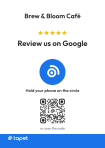
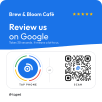
How it works
- 01
Customer taps or scans
They hold their phone near the card, or point the camera at the QR code.
- 02
Your review page opens
Google's review box for your business opens in their browser, ready for stars.
- 03
They post the review
It takes seconds, so more happy customers actually do it.
Why an NFC review card works better than asking
Most happy customers mean to leave a review and forget by the time they reach home. Finding a business on Google Maps, scrolling to the reviews and tapping 'Write a review' is enough friction to lose them.
A Google review card removes every one of those steps. The ask happens at the counter, at the moment they're happiest, and the review box is one tap away.
Cards, plaques, table stands and stickers
Pick the format that fits where your customers stand: wallet-size PVC cards to hand over with the bill, acrylic plaques for the billing counter, table stands for restaurants and cafés, and round or square stickers for doors, menus and mirrors.
Every product carries both an NFC chip and a QR code, so it works on every phone, including older iPhones without NFC.
Your logo, your colours, printed as previewed
Upload your logo and choose a design when you order. The preview is drawn by the same code that makes our print file, so what you approve is what arrives.
Locked chip, link you control
The chip on every standard card is locked after we write it, so nobody can rewrite it to point somewhere else. It opens a tapet.in link that you manage, so you can switch it from Google reviews to Instagram or a festive menu any time without reprinting.
Questions
Does the tap work on iPhone and Android?
Yes. iPhone XS and newer read NFC without any app: hold the top of the phone near the tag. Most Android phones with NFC switched on open it straight away. Every Tapet product also carries a QR code for older phones.
Do customers need to install an app?
No. The tap or scan opens a normal web page in the phone's browser.
How do I find my Google review link?
When you set up your tag, paste your Google review link or your Place ID. Google's free Place ID finder gives it to you in a few seconds, and you can change it later from your dashboard.
Can I change where the tag opens later?
Yes. Every Tapet tag opens a tapet.in link that you control, so you can point it at Google reviews, Instagram, WhatsApp, a menu or any other link from your dashboard. Nothing needs to be reprinted.
Is there a monthly subscription?
No. Review cards, stands and stickers are a one-time purchase and the tag keeps working.